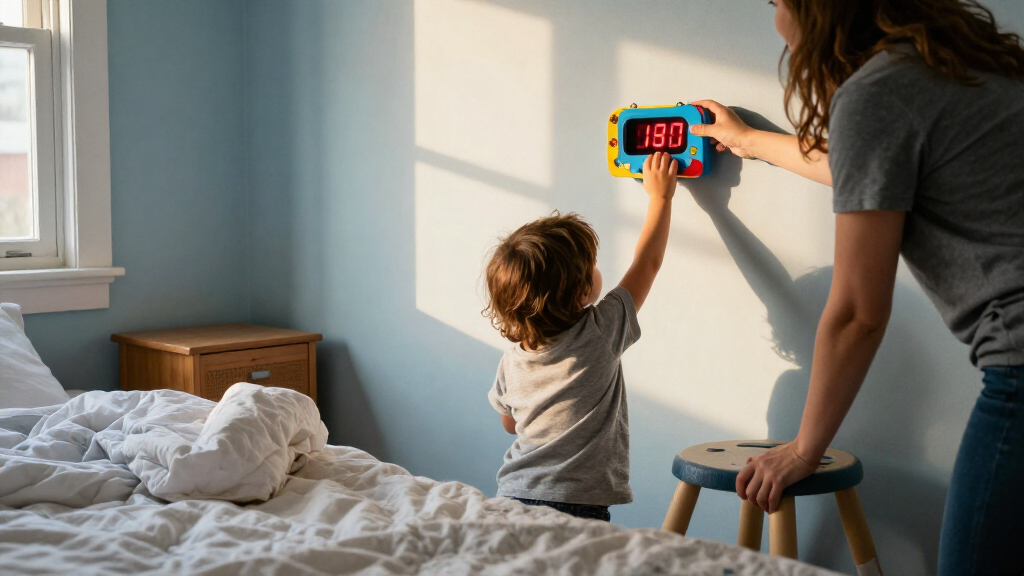

Choosing a digital wall clock for a child is less about finding the most entertaining design and more about deciding what the clock needs to do. A simple, large-display digital wall clock makes the time easy to read from across a bedroom or playroom. A feature-rich clock designed for kids may add alarms, timers, changing colors, or visual cues for sleep and wake routines. Those additions can help a child build independence, but they also add complexity and can raise the price.

Get decor and gifts delivered free with Prime
- Fast, free delivery on millions of items
- Prime Video, Amazon Music and more included
- Member-only deals all year

EASYERA 16.5-Inch Digital Wall Clock with Bluetooth Sync and 11 RGB Colors
- ✔ Display: 16.5-inch LED
- ✔ Lighting: 11 RGB colors; adjustable brightness
- ✔ Time sync: Bluetooth phone syncing

JALL 12-Inch Digital Wall Clock with Large LED Display, 8 Colors, Auto-Dimming, and Night Light
- ✔ Display: 12-inch digital LED
- ✔ Digit height: 3.5 inches
- ✔ Display colors: 8
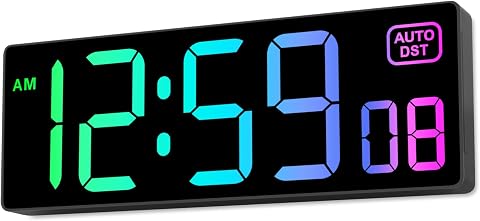
Soobest Digital Wall Clock with Seconds and 8 RGB Color Modes
- ✔ Display: 10.2-inch RGB LED
- ✔ Digit height: 2.8 inches
- ✔ Color modes: 8
The main tradeoff is clarity and simplicity versus routine support. Choose a basic large-display clock if your child mainly needs to see the time, or if you want a dependable display with few settings to manage. Choose a kids’ model if its particular features solve a real household problem, such as getting ready on time or understanding when it is okay to get up. The best choice depends on the child’s age, the room, and whether anyone will use the extra functions.
At a Glance
| Criteria | Simple, large-display digital wall clocks | Feature-rich digital clocks designed for kids | Winner |
|---|---|---|---|
| Time readability | Usually a large, high-contrast display designed for quick viewing | Varies; playful styling should not come at the expense of readable digits | A |
| Routine and alarm features | Typically basic; may include an alarm, but fewer routine tools | May offer alarms, timers, color cues, or sleep and wake indicators | B |
| Ease of setup | Fewer modes and settings to learn | More settings can take adult setup and child practice | A |
| Design and child appeal | Often plain, though many styles and colors are available | Often more playful and tailored to children’s rooms | B |
| Durability and placement | Depends on the specific model; check mounting, power, and controls | Features and construction vary; extra buttons or lights may need supervision | Depends |
| Value | Usually lower cost when time display is the main need | Higher cost can pay off when the added functions get regular use | Depends |
EASYERA 16.5-Inch Digital Wall Clock with Bluetooth Sync and 11 RGB Colors
The EASYERA is the strongest choice when a child needs to read the time from across a larger bedroom. Its 16.5-inch LED display is substantially larger than Soobest’s 10.2-inch screen and JALL’s 12-inch clock, giving it the clearest case for visibility at a glance. That scale can be useful for a child learning to check the time independently, though it also makes the clock a more prominent part of the room.Its practical edge is the combination of Bluetooth phone syncing and automatic daylight saving adjustment. That reduces the routine work of keeping it accurate compared with manually managed settings, while dual alarms add flexibility for wake-up routines. JALL also supports daylight saving adjustment, but EASYERA goes further with phone syncing and two alarms. Families who want a dedicated display without alarms may find those additions unnecessary.Eleven RGB colors and adjustable brightness offer ways to coordinate the display with a room, but the listed details do not specify a light sensor or a separate night light as JALL does. So if hands-off dimming or gentle backlighting is the priority, the JALL is the more targeted bedroom pick. EASYERA is also the largest option here, measuring 15.6 inches wide, and it needs a nearby outlet despite its memory battery. Choose it for visibility and synchronization; skip it if wall space, minimal lighting or a cordless setup matters more.
Pros:
- Largest display in this comparison at 16.5 inches.
- Bluetooth phone syncing plus automatic daylight saving adjustment.
- Eleven RGB colors and adjustable brightness.
- Wall or tabletop placement, dual alarms and an 11.5-foot cord.
Cons:
- Requires a 5V/2A adapter and access to an outlet.
- Its wide 15.6-inch body may dominate a small bedroom wall.
- No light sensor or separate back night light is listed.
Best for: Families placing a highly visible clock in a larger child’s bedroom and wanting Bluetooth syncing, automatic daylight saving adjustment and dual alarms.
Not ideal for: Children who need a particularly compact clock, families seeking a battery-powered unit, or buyers prioritizing a listed light sensor or separate back night light.
Bottom line: The best overall fit when room-spanning visibility and easier time synchronization matter more than a compact footprint or sensor-based nighttime lighting.
“The best overall fit when room-spanning visibility and easier time synchronization matter more than a compact footprint or sensor-based nighttime lighting.”
JALL 12-Inch Digital Wall Clock with Large LED Display, 8 Colors, Auto-Dimming, and Night Light
JALL makes the most sense for a child’s room where nighttime brightness is as important as daytime readability. Its 12-inch body and 3.5-inch digits provide a substantial display, while an adjustable light sensor changes brightness with ambient conditions. That is a more bedroom-focused feature set than the Soobest’s five selectable dimmer levels: the Soobest offers defined manual steps, but JALL adds automatic adjustment and a gentle back night light.Compared with EASYERA, JALL is less imposing and emphasizes a softer nighttime setup over maximum display size and phone syncing. It still offers eight display colors and daylight saving adjustment, and it can sit on a table or mount to a wall. The back light may be useful as low-level room illumination, but families who want a clock with dual alarms or Bluetooth time syncing should look to EASYERA instead; those features are not listed for JALL.The tradeoff is that JALL remains a corded indoor clock, not a portable battery-powered one. Its 10.5-foot cable gives some placement latitude, and an internal memory battery retains settings if unplugged, but a socket is still necessary for operation. Its feature mix is less about adding routines and more about balancing large digits with light management. Choose it when a child needs readable time without a fixed bright display; skip it if the biggest screen or syncing tools are your priorities.
Pros:
- 3.5-inch digits on a 12-inch display for easy viewing.
- Adjustable brightness with an ambient light sensor.
- Separate back night light for gentle illumination.
- Eight display colors, wall or tabletop placement, and memory support.
Cons:
- Requires a 5V power adapter; it does not run as a battery-operated clock.
- Indoor use only.
- No Bluetooth syncing or alarm is listed.
Best for: Children who need large, easy-to-see digits and families who want sensor-based dimming with a gentle back night light.
Not ideal for: Buyers who want Bluetooth syncing, dual alarms, the largest possible display or a fully battery-operated clock.
Bottom line: The most bedroom-oriented balance of readable digits and nighttime light control, especially for families who prefer automatic dimming to a larger, feature-heavy display.
“The most bedroom-oriented balance of readable digits and nighttime light control, especially for families who prefer automatic dimming to a larger, feature-heavy display.”
Soobest Digital Wall Clock with Seconds and 8 RGB Color Modes
Soobest is the practical choice when a child’s room does not have space for EASYERA’s broad 15.6-inch body. The 10.2-inch screen and 2.8-inch digits are smaller than JALL’s 3.5-inch numerals, yet still provide a clear wall display in a more compact form. At 9.7 inches wide and 8.64 ounces, it is also the lightest option in this group, making it easier to fit above a desk or on a tighter wall.Its standout detail is the seconds display, alongside eight RGB modes, five dimmer levels and 12- or 24-hour formats. Those settings offer more direct control over how the time is presented than the details listed for JALL, while JALL counters with its ambient sensor and back night light. Soobest also includes automatic daylight saving adjustment, but it has no alarm. That makes it a focused time display rather than a wake-up station like EASYERA.Five dimmer levels are useful if a child prefers a manually chosen brightness, though they do not provide the automatic response described for JALL. The clock can be mounted on a wall or used on a desk, and its memory function helps preserve settings during an outage. Still, it needs an adapter and its plastic construction is a simpler proposition than its feature list might suggest. Pick Soobest for compact size, seconds and manual dimming; choose a larger model if reading from across a wide room is the priority.
Pros:
- Compact 10.2-inch screen with 2.8-inch digits.
- Five dimmer levels and eight RGB color modes.
- Displays seconds and supports 12- and 24-hour formats.
- Wall mounting, desk use, automatic daylight saving adjustment and memory function.
Cons:
- Requires an adapter and is not battery operated.
- No alarm is listed.
- Plastic construction and smaller digits than JALL or EASYERA.
Best for: Families looking for a smaller wall or desk display with seconds, manual dimmer choices and both 12- and 24-hour formats.
Not ideal for: Children who need the biggest digits, families who want an alarm, or buyers who prefer sensor-based auto-dimming and a separate night light.
Bottom line: A space-saving choice for children who want seconds and manual brightness control, provided a smaller display and lack of alarm suit the room.
“A space-saving choice for children who want seconds and manual brightness control, provided a smaller display and lack of alarm suit the room.”
As an Amazon Associate we earn from qualifying purchases.
Key Differences
Display clarity is the first test for any wall clock a child is expected to use independently. A large, high-contrast time display tends to serve that job directly: the child can glance up without walking over or interpreting symbols. A kids’ clock can be just as readable, but themed graphics, small digits, or bright effects can compete with the time. Check the actual display and viewing distance rather than assuming a child-focused label guarantees easy reading.
The feature-rich option earns its price through specific tasks, not through the number of modes it advertises. An alarm can cue a morning routine, a timer can make a short task concrete, and a visual sleep or wake signal can help a young child who cannot yet read the time well. If those functions fit the family’s routine, they may reduce repeated reminders. If the clock will only hang on the wall and show the time, its extra features add settings without adding much value.
Setup and placement also shape the decision. A simpler clock usually asks less of parents and children, while a model with several controls may need initial configuration and occasional troubleshooting. For either type, confirm how it receives power, whether it can mount securely, and whether the display remains visible in the room’s lighting. A modest clock with clear digits and a suitable location can serve better than a feature-packed model whose display is hard to see.
Detailed Comparison
Time readability (Simple, large-display digital wall clocks wins — moderate)
A large-display clock has the advantage when its digits are high contrast and sized for the distance from bed or desk. The difference is moderate because some kids’ models also use clear, prominent numbers, while others make decorative elements more noticeable. For a child learning to check the time, prioritize legibility over novelty.
Routine and alarm features (Feature-rich digital clocks designed for kids wins — major)
Feature-rich kids’ clocks win by offering more ways to cue behavior, such as alarms, countdowns, or visual sleep and wake signals. The gap is major for a family that will use these tools every day; a visual cue can be especially useful before a child can read the time confidently. For a household that already uses another alarm or routine system, the added functions may go unused.
Ease of setup (Simple, large-display digital wall clocks wins — moderate)
A basic display generally has fewer controls and modes, making it easier to set and explain. The advantage is moderate: extra features do not automatically make a clock difficult, but they create more settings to learn and maintain. Choose the simpler model if the child or caregiver wants a clock that works with minimal adjustment.
Design and child appeal (Feature-rich digital clocks designed for kids wins — minor)
Kids’ models usually offer more playful styling and colors, so they are more likely to feel like a deliberate part of a child’s room. This is a minor win because appeal is personal, and plain clocks are available in varied finishes too. A fun look matters when it encourages the child to interact with a useful routine feature; it matters less if the clock is mainly for adults to read.
Durability and placement (moderate difference)
Neither category wins as a group. Mounting method, materials, power source, button placement, and display brightness differ by model. The difference is moderate in practical terms because a clock should stay secure and readable without being easy to knock down or accidentally reset. Check the product details and place it where the display is visible but controls are not a distraction.
Value (moderate difference)
The simpler clock is better value when the main job is showing the time. A feature-rich model can justify a higher price if its alarms or visual cues solve a recurring routine problem and will be used consistently. This is a moderate difference: paying more buys potential usefulness, not automatically better timekeeping or readability.
Simple, large-display digital wall clocks: Pros and Cons
Pros:
- Large digits can be easy to read from across a room
- Fewer controls make setup and daily use straightforward
- Often costs less when a basic time display is all that is needed
Cons:
- Usually offers fewer tools for managing bedtime or morning routines
- A plain design may feel less engaging to some children
- May not provide timers or child-focused visual cues
Feature-rich digital clocks designed for kids: Pros and Cons
Pros:
- May combine time display with alarms, timers, or routine cues
- Playful designs can suit a child’s room and encourage use
- Can support independence when features match the child’s needs
Cons:
- Extra settings can take time to configure and explain
- Some designs may give decoration more attention than display clarity
- Higher cost is poor value if the added features go unused
Who Should Choose What
Choose Simple, large-display digital wall clocks if:
- Your child mainly needs a clear time display in a bedroom, playroom, or study area.
- You prefer fewer settings and a lower-cost purchase.
- The child can already follow routines without a special alarm or visual cue.
Choose Feature-rich digital clocks designed for kids if:
- A timer, alarm, or sleep and wake signal would address a recurring routine challenge.
- Your child responds well to visual cues or a clock they find appealing.
- You are willing to set up the features and help the child learn how to use them.
Skip both if: Skip both if the clock must meet a specific need—such as a particular mounting method, power source, or accessibility feature—that neither model can confirm. Compare those requirements before buying.
Value for Money
Paying more makes sense when a child-focused feature will be used regularly and does something the household currently handles with repeated reminders. For example, a visual sleep or wake signal may support a young child who is not yet comfortable reading a clock. A timer can also make a short activity easier to understand. In those cases, the additional cost buys a practical aid, and a model with fewer but useful features can be worth the premium.
If the clock’s job is simply to show the time, a clear basic display is usually the better value. Do not treat a longer feature list as evidence of a better clock: check readability, power, mounting, and controls first. The right value is the least expensive option that handles the child’s actual daily needs.
Final Verdict
For most families seeking a clock primarily to show the time, choose a simple large-display model. It keeps the decision focused on what the child needs most: digits that are easy to see and settings that are easy to use. Choose a feature-rich kids’ clock when an alarm, timer, or visual routine cue has a clear job in your child’s day and you expect to use it often.
The biggest deciding factor is whether the extra functions solve a real routine problem. If they do, the higher price can be worthwhile; if they do not, pay for readability and suitable mounting instead. Before choosing either style, check that the display is legible from the intended spot and that the clock’s power and controls fit the room.
Frequently Asked Questions
Is a large-display clock better for a child learning to tell time?
It can make the numbers easier to see, especially from a bed or desk, but a digital display alone does not teach how an analog clock works. Choose a high-contrast screen with digits your child can read at the planned viewing distance.
Are extra routine features worth paying more for?
They can be if your family will use them consistently. An alarm, timer, or visual sleep and wake cue may help a child follow a routine with fewer reminders. If you only need to display the time, the extra cost is unlikely to add much value.
Which type is easier for a young child to use?
A simple clock is usually easier to operate because it has fewer settings. A feature-rich model may still suit a young child if an adult configures it and the child only needs to respond to a clear cue, such as a light or alarm.
What should I check before buying a wall clock for a child’s room?
Check display size and contrast from the intended viewing position, how the clock is powered, how it mounts, and whether its controls are simple to reach or manage. If considering a kids’ model, confirm that the feature you want is included and can be set the way your household needs.